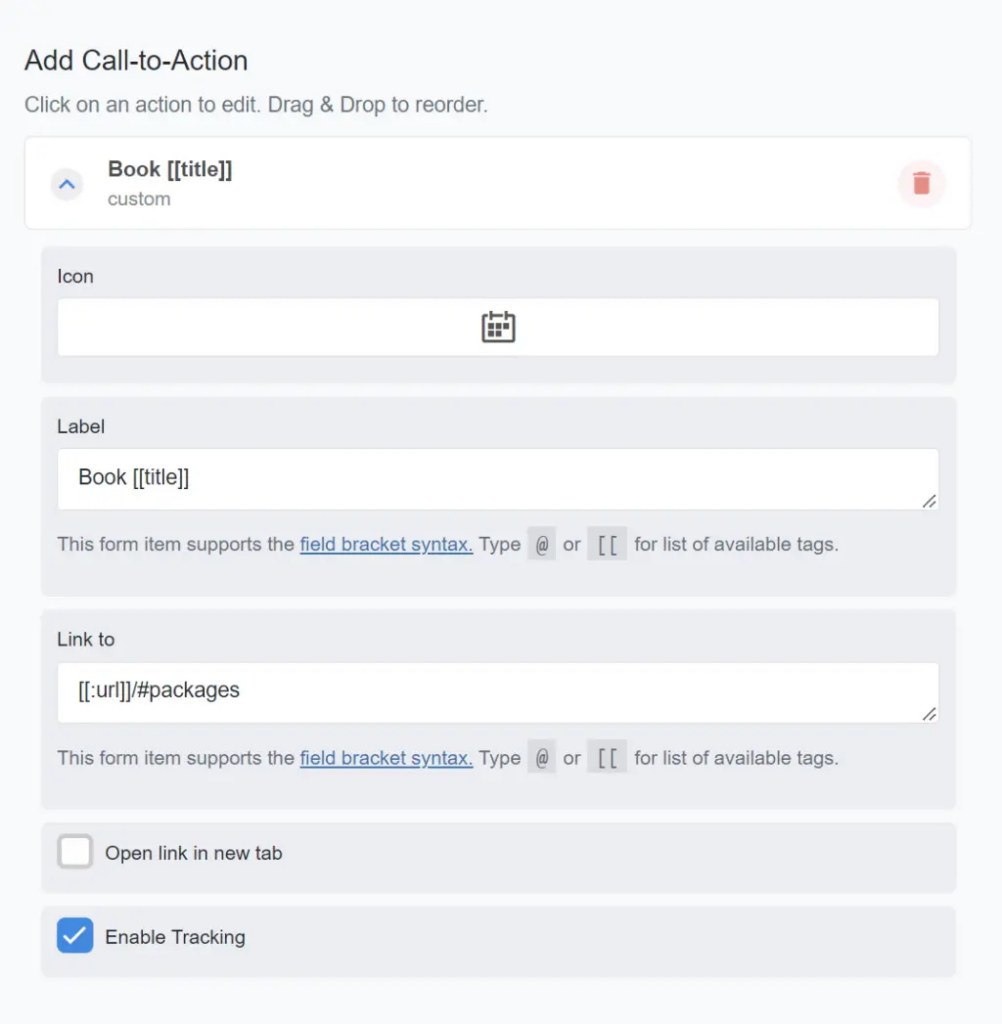
Let’s say you have listing owners who offer packages and want to show all those packages in a single listing content tab. An excellent example of this would be a coach who wants to offer coaching packages.
In this guide, I’ll show you how to add a custom call-to-action (CTA) to the listing’s cover detail area, dynamically populate the CTA with the listing title (or whatever you choose), and link the CTA to a specific tab within the listing.
- Edit the Listing Type
- Single Page > Cover Details > Add Call-to-Action > Drag the Add Custom Action item to this area
- Icon > Choose an icon
- Label > Grab the preconfigured label below to automatically pull in the listing’s title (name)
Book [[title]]- Link To > Grab the preconfigured label below to automatically pull in the listing URL and append the single listing content tab named “Packages.”
[[:url]]/#packages- Open Link In New Tab > Uncheck
- Enable Tracking > Configure as desired. (Note: To help prove the value of your directory, it’s probably a good idea to show the listing owner how many times people have viewed this particular content tab.).